Introduction
In today’s world, touch technology is everywhere, from smartphones to home appliances. If you want to learn how capacitive touch works and start building your own touch-based projects, the Capmini board by Texas Instruments is the perfect tool. Designed for beginners and professionals alike, Capmini makes it easy to experiment, test, and develop responsive touch applications using the MSP430 microcontroller. In this guide, you’ll discover how Capmini works, its key features, practical applications, and how it can help you bring innovative touch ideas to life.
What Is Capmini?
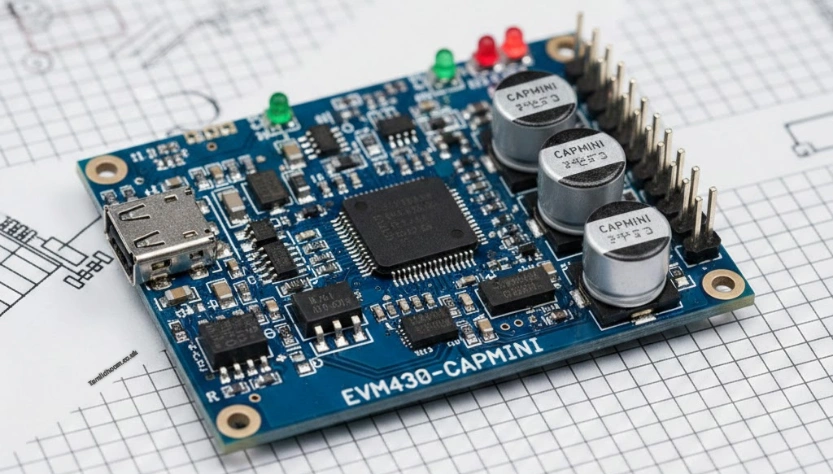
Capmini refers to the EVM430-CAPMINI, a compact development board built around the MSP430 microcontroller from Texas Instruments. The board is designed specifically for capacitive touch sensing, which allows devices to detect touch without using physical buttons.
Instead of pressing a mechanical switch, users simply touch a pad or surface. The board senses small changes in electrical capacitance caused by the human finger. This signal is then processed by the microcontroller to perform an action, such as turning on a light or changing a menu option.
Capmini is not a consumer product. It is a learning and development tool. Engineers use it to test ideas, write software, and experiment with touch interfaces before creating a final product.
Understanding Capacitive Touch Technology
To understand Capmini, it helps to know what capacitive touch means. Capacitance is ability of object to store an electric charge. The human body naturally holds a small electrical charge.
When a finger comes close to or touches a sensor pad, it changes the electrical field around that pad. Capmini detects this change and sends the information to the MSP430 microcontroller. The microcontroller then decides what action to take.
This method has many advantages. There are no moving parts, so it lasts longer. The surface is smooth and easy to clean. It also allows for modern, sleek designs that users are familiar with.
The Role of the MSP430 Microcontroller
At the heart of Capmini is the MSP430, a low-power microcontroller developed by Texas Instruments. It is known for being efficient, reliable, and easy to program.
The MSP430 processes the signals coming from the capacitive touch sensors. It runs software that decides whether a touch is real or accidental. It can also manage timing, sensitivity, and power usage.
One major benefit of the MSP430 is its low power consumption. This makes Capmini especially useful for battery-powered devices such as remote controls, wearable electronics, and portable medical tools.
Key Features of the Capmini Board
Compact but Powerful Design
Capmini is small in size, yet it offers robust features that make learning and development simple and effective.
Built-In Touch Pads and Sliders
The board includes capacitive touch pads, sliders, and buttons, allowing developers to test and understand different touch designs.
Compatible with TI Software Tools
Capmini works seamlessly with Texas Instruments’ software, enabling users to write code, test touch sensitivity, and debug projects easily.
Flexible and Customizable
Developers can adjust settings, change sensitivity, and experiment with layouts, making Capmini a practical platform for real-world applications.
Why Capmini Is Important
Capmini is important because it lowers the barrier to entry for capacitive touch development. Without a board like this, developers would need to design hardware from scratch, which takes time and experience.
By using Capmini, users can focus on learning how touch sensing works instead of worrying about complex hardware design. This speeds up development and reduces mistakes.
Capmini also helps companies test ideas quickly. Before building a full product, engineers can use the board to check if a touch interface feels natural and responsive. This saves money and improves product quality.
Who Should Use Capmini?
Capmini is useful for many different people. Engineering students can use it to learn about embedded systems and touch technology. Teachers can use it as a hands-on learning tool in classrooms and labs.
Professional developers use Capmini to prototype new ideas. It helps them test touch controls for consumer electronics, home automation systems, and industrial equipment.
Hobbyists and makers can also benefit from Capmini. Anyone interested in electronics and microcontrollers can use it to explore touch-based projects and improve their skills.
Common Applications of Capmini
Consumer Electronics
Capmini is widely used in consumer devices like touch panels for appliances and control systems, helping developers create reliable and responsive touch interfaces.
Medical Devices
In healthcare, touch interfaces are preferred for their ease of cleaning and use. Capmini allows engineers to test sensitivity while maintaining low power consumption.
Industrial Applications
Capmini is valuable in industrial settings where mechanical buttons wear out. Touch sensors reduce maintenance and improve durability.
Educational Projects
Capmini serves as a hands-on learning tool, helping students understand how hardware and software work together in real-world applications.
Software and Development Tools
Texas Instruments provides software tools that work well with Capmini. These tools help users write programs, adjust touch settings, and analyze sensor data.
The software includes example projects that demonstrate basic touch functions. Users can modify these examples to create their own designs. This step-by-step approach makes learning easier, even for beginners.
Debugging tools allow developers to see how the system responds to touch in real time. This helps identify errors and improve performance.
Benefits of Using Capmini
One major benefit of Capmini is ease of use. The board is designed to be beginner-friendly while still offering advanced features for professionals.
Another benefit is energy efficiency. The MSP430 microcontroller allows touch sensing with very low power usage, which is ideal for portable devices.
Capmini also encourages experimentation. Users can safely test ideas, learn from mistakes, and improve their designs without high costs.
Finally, Capmini is backed by Texas Instruments, a trusted name in electronics. This means users get reliable hardware and well-documented resources.
Limitations to Keep in Mind
While Capmini is very useful, it does have limits. It is an evaluation board, not a finished product. Developers still need to design custom hardware for mass production.
The board is mainly focused on capacitive touch, so it may not be suitable for projects that require many other sensors or complex graphics.
However, these limits are expected and do not reduce its value as a learning and prototyping tool.
Capmini in Learning and Innovation
Capmini plays a strong role in education and innovation. It helps people understand modern touch technology in a simple and practical way.
By allowing hands-on learning, Capmini builds confidence. Users can move from basic experiments to real-world applications with ease.
Many ideas that start on evaluation boards like Capmini later become successful products. This makes it an important stepping stone in technology development.
Final Thoughts
Capmini is a powerful yet simple tool for anyone interested in capacitive touch technology. Built around the MSP430 microcontroller, it offers an easy way to learn, test, and develop touch-based applications.
Whether you are a student, engineer, teacher, or hobbyist, Capmini provides real value. It saves time, reduces complexity, and helps turn ideas into working solutions.
As touch technology continues to grow, tools like Capmini will remain important for learning and innovation. Understanding how Capmini works is a strong first step toward building modern, user-friendly electronic devices.